Flagship touchscreen system

Touchscreen Weighing Scale With Printer

The Punit touchscreen weighing scale with printer combines a configurable weighing platform, 10.1-inch Android operator display, ribbon-based thermal-transfer label printer and Punit ERP. It is available for industrial material control and suitable retail weighing workflows.

WhatsApp your requirementor call +91 97253 53523
Punit Touchscreen Weighing Scale With Printer – touchscreen based weighing system with barcode label printer
Real Punit product Touchscreen · Platform · Printer · Punit ERP
LIVE WEIGHT124.850 kg
Configured quotationMatched to the application
0.200 mg - 10 tonRange across configurations
5-year warrantySubject to quotation terms
Industrial + retailApplication configured
01 / FIT

Who should consider this system?

Start with the operational outcome. Hardware selection follows the material, handling method and data journey.

02 / WORKFLOW

From stable weight to a traceable transaction.

Each step is controlled, visible and designed around the operator.

  1. 01

    Select the product on the touchscreen

  2. 02

    Capture stable gross, tare and net weight

  3. 03

    Save the weighment and create its identity

  4. 04

    Print the barcode or QR label

  5. 05

    Sync inventory, dispatch and report data

03 / SYSTEM

Specify the complete system.

Final values depend on the actual material, operating environment and required integration.

Touchscreen10.1-inch Android operator display
RangeConfigurations from 0.200 mg readability through 10-ton capacity
Platform300 x 300 mm to 1800 x 1800 mm in SS or MS
PrinterRibbon-based thermal-transfer label printer
Commercial scopeApplication-specific quotation after requirement review
04 / OUTPUT

What the label can carry.

Use a readable layout and a stable transaction identity. Print only the fields operators and downstream systems genuinely need.

Product and gradeGross, tare and net weightBatch or heat numberDate, time and operatorUnique barcode or QR codeCustomer-defined traceability fields
PUNIT INSTRUMENTPRODUCTION LABEL

ALUMINIUM COIL · 6061

Gross
148.250 kg
Tare
23.400 kg
Net weight
124.850 kg
||| || |||| | ||| || ||||
TXN · 260711-0042 · LINE 02
REAL OUTPUT · LIVE SYSTEM PROOF

Labels printed by Punit weighing scales.

Customer-supplied photographs of live printed output across industries. These examples show how touchscreen weighing scale with printer can carry the fields each factory actually needs—not a fixed generic label.

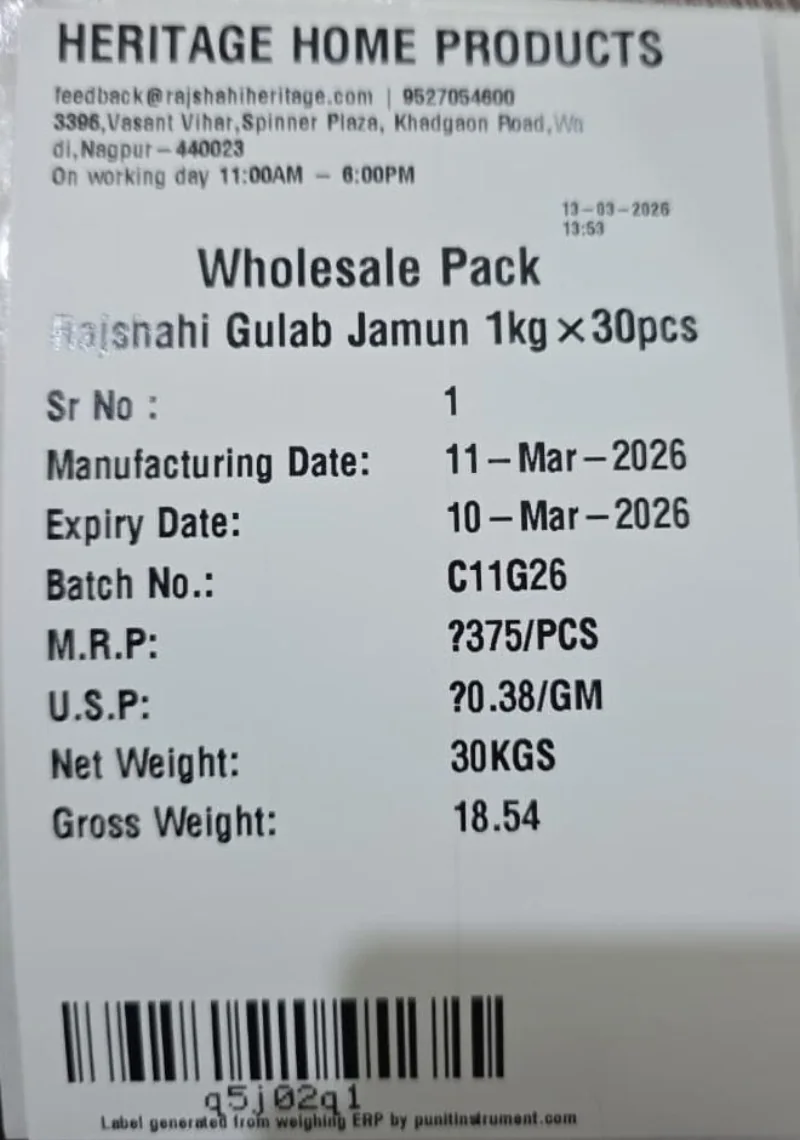
Real fmcg food & sweets barcode weight label printed from a Punit weighing scale with printer
FMCG food & sweetsWholesale-pack label with manufacturing and expiry dates, batch, MRP, gross/net weight and barcode.
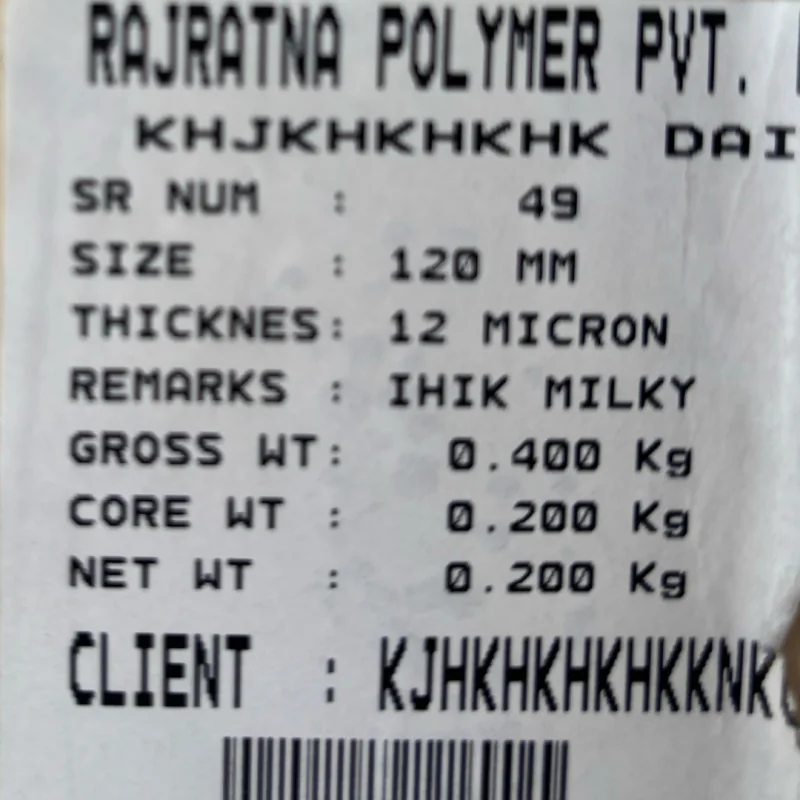
Real plastic & shrink-film rolls barcode weight label printed from a Punit weighing scale with printer
Plastic & shrink-film rollsRoll size, micron, remarks, gross, core and net weight with customer and barcode.
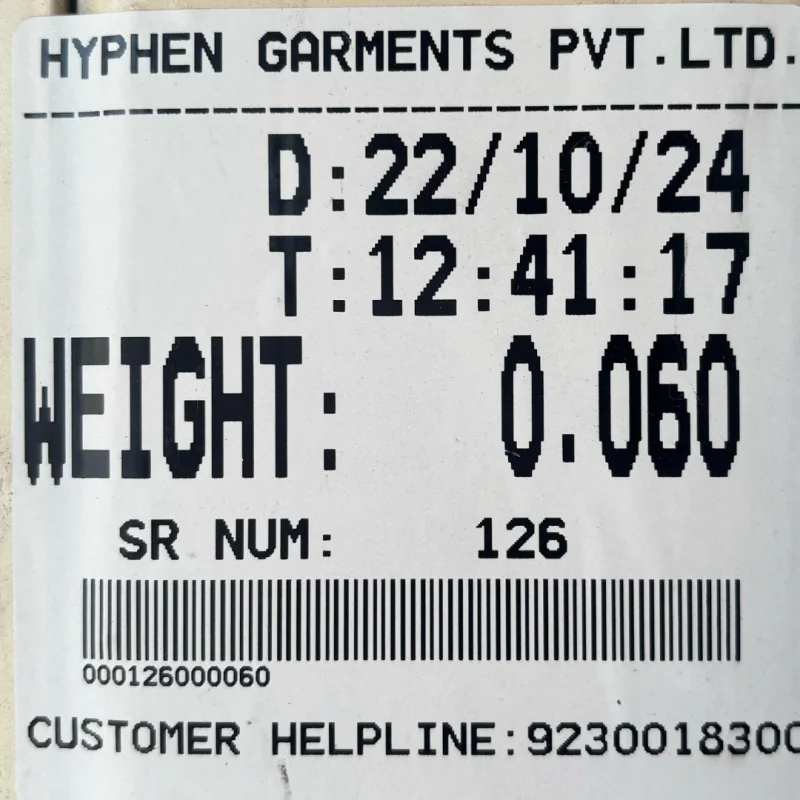
Real textile & garments barcode weight label printed from a Punit weighing scale with printer
Textile & garmentsDate, time, serial number, accepted weight, customer reference and barcode.
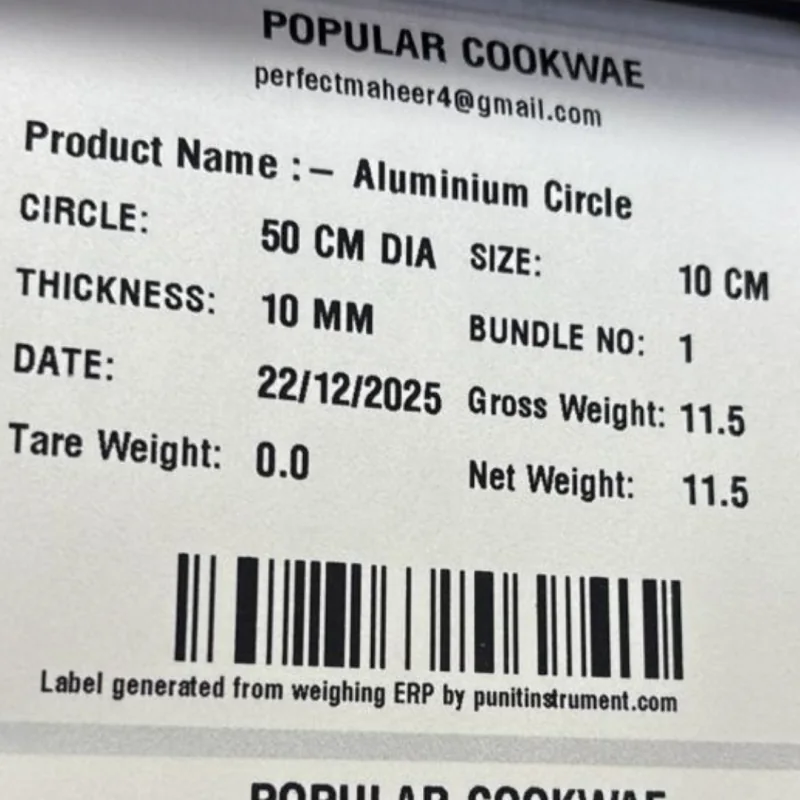
Real aluminium cookware barcode weight label printed from a Punit weighing scale with printer
Aluminium cookwareDiameter, thickness, bundle number, gross/tare/net weight and barcode identity.
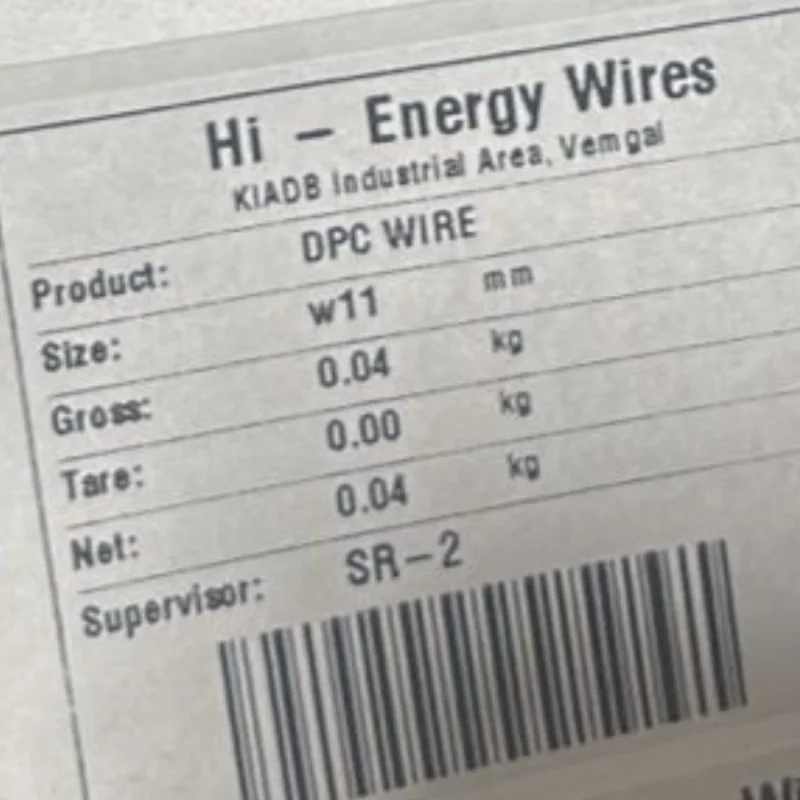
Real wire & cable bobbins barcode weight label printed from a Punit weighing scale with printer
Wire & cable bobbinsWire size, gross, tare and net weight, supervisor and barcode.
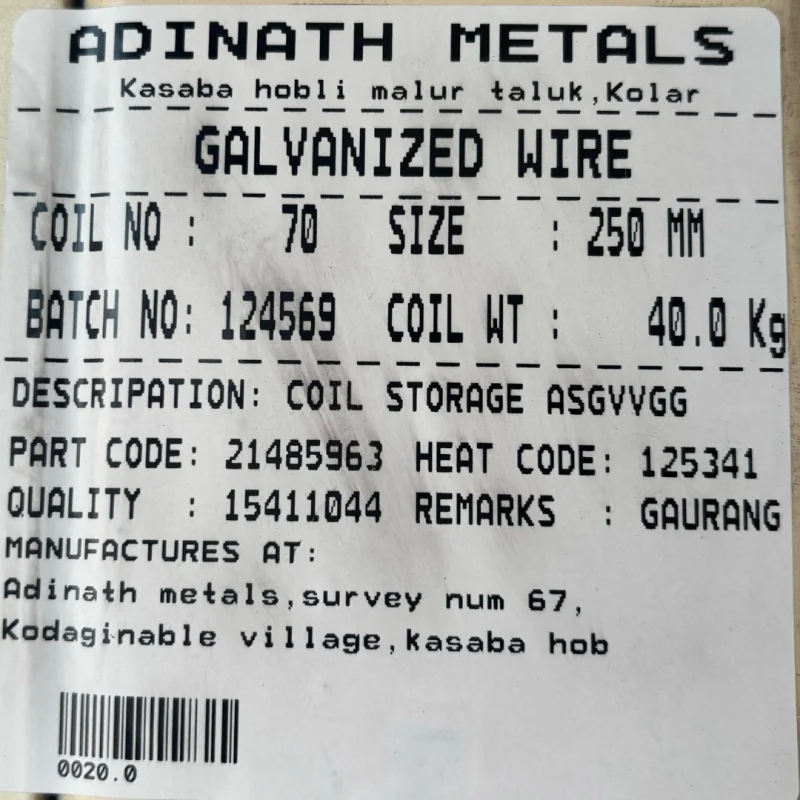
Real galvanized wire coils barcode weight label printed from a Punit weighing scale with printer
Galvanized wire coilsCoil number, size, batch, coil weight, part code, heat code, quality and barcode.
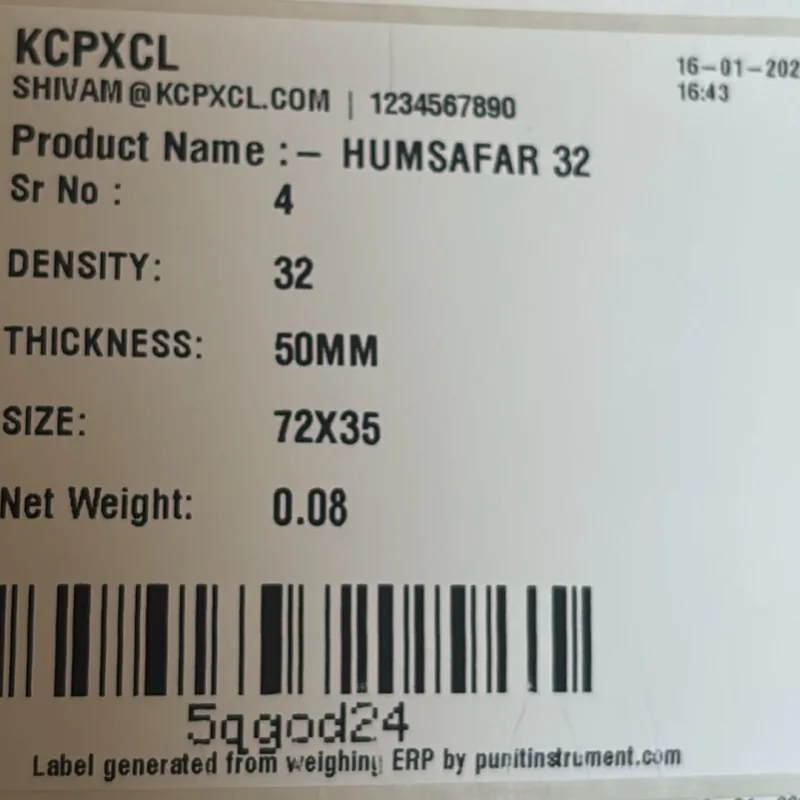
Real foam & insulation sheets barcode weight label printed from a Punit weighing scale with printer
Foam & insulation sheetsDensity, thickness, size, serial number, net weight and barcode.
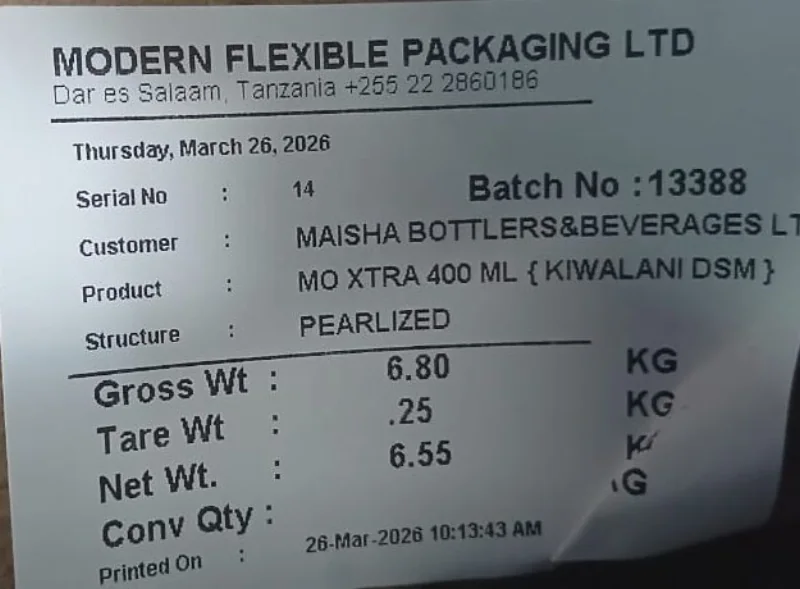
Real flexible packaging barcode weight label printed from a Punit weighing scale with printer
Flexible packagingCustomer, product structure, batch, gross/tare/net weight and conversion quantity.
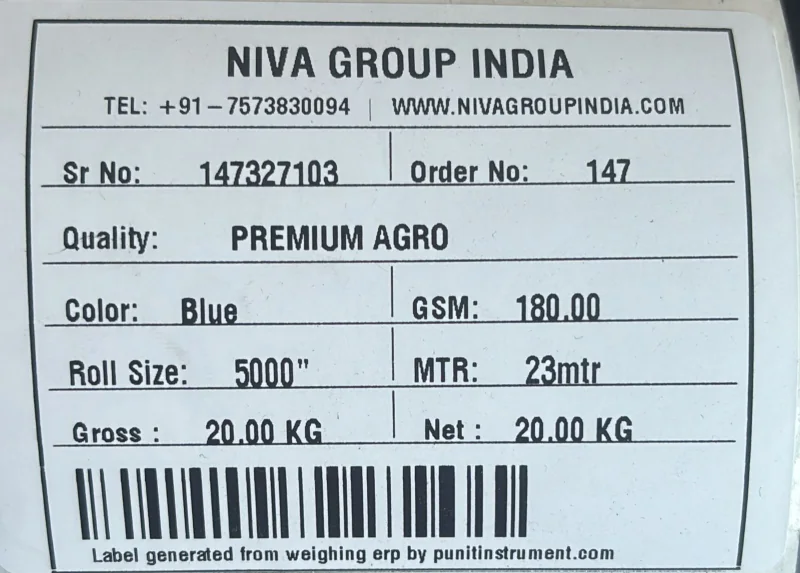
Real non-woven fabric rolls barcode weight label printed from a Punit weighing scale with printer
Non-woven fabric rollsQuality, colour, GSM, roll size, metres, gross/net weight and barcode.
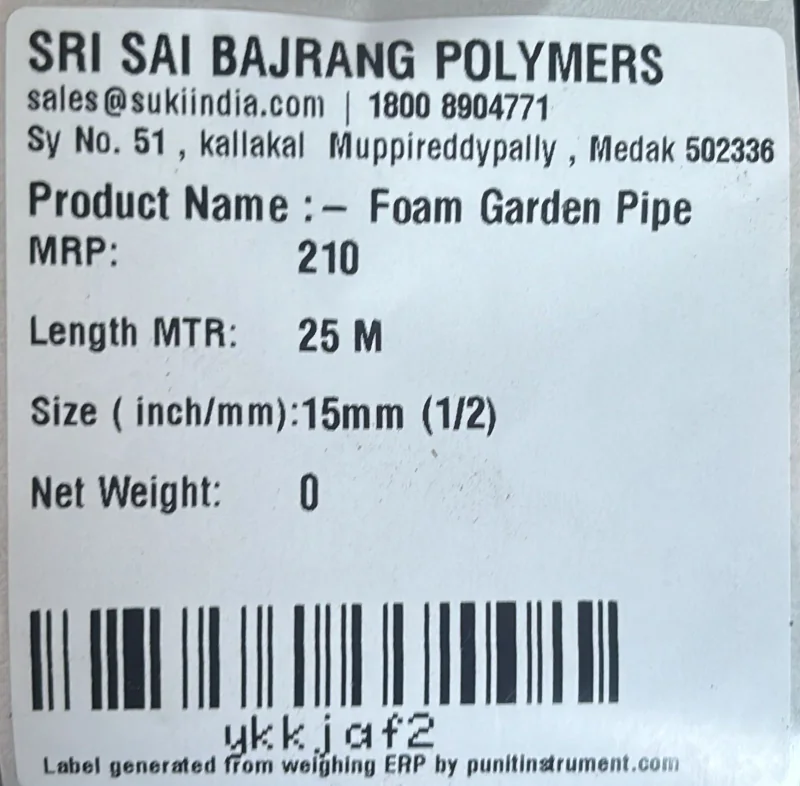
Real polymer & garden pipes barcode weight label printed from a Punit weighing scale with printer
Polymer & garden pipesProduct, MRP, length, pipe size, net weight and barcode.
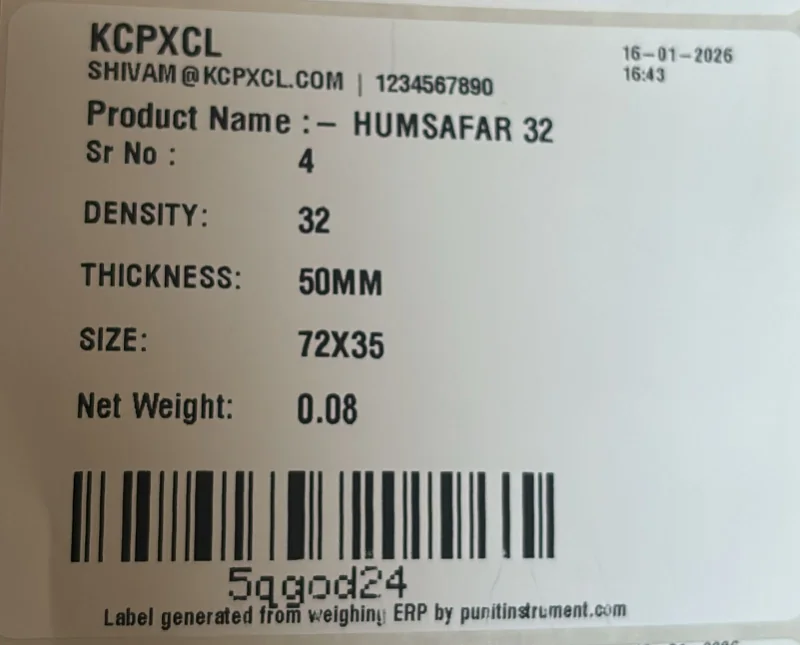
Real foam product manufacturing barcode weight label printed from a Punit weighing scale with printer
Foam product manufacturingDensity, thickness, dimensions, net weight and scan-ready barcode.
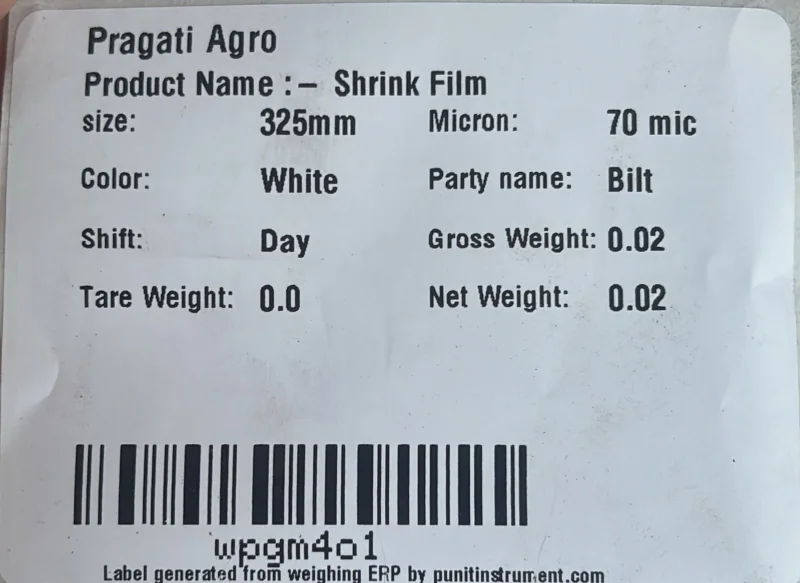
Real shrink-film production barcode weight label printed from a Punit weighing scale with printer
Shrink-film productionSize, micron, colour, party, shift, gross/tare/net weight and barcode.
Real tarpaulin & technical textiles barcode weight label printed from a Punit weighing scale with printer
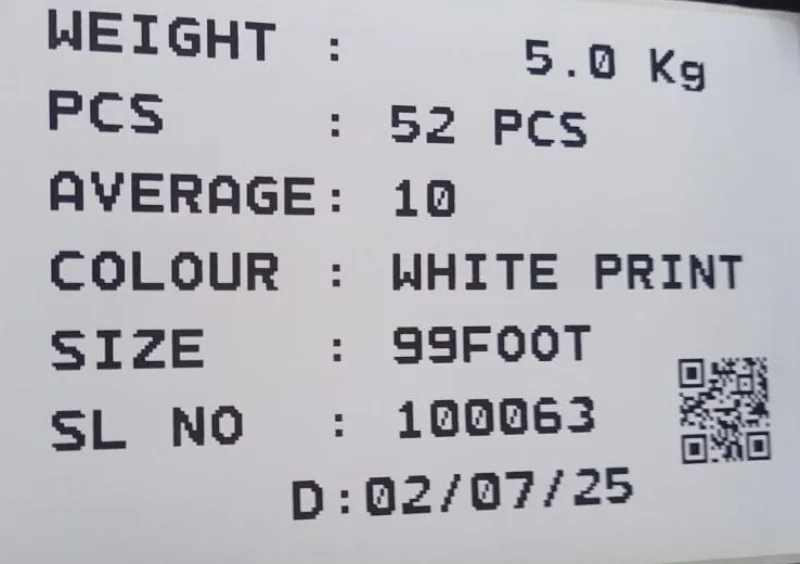
Tarpaulin & technical textilesWeight-to-pieces conversion, average weight, colour, size, serial and QR code.
Real electrical cable packaging barcode weight label printed from a Punit weighing scale with printer
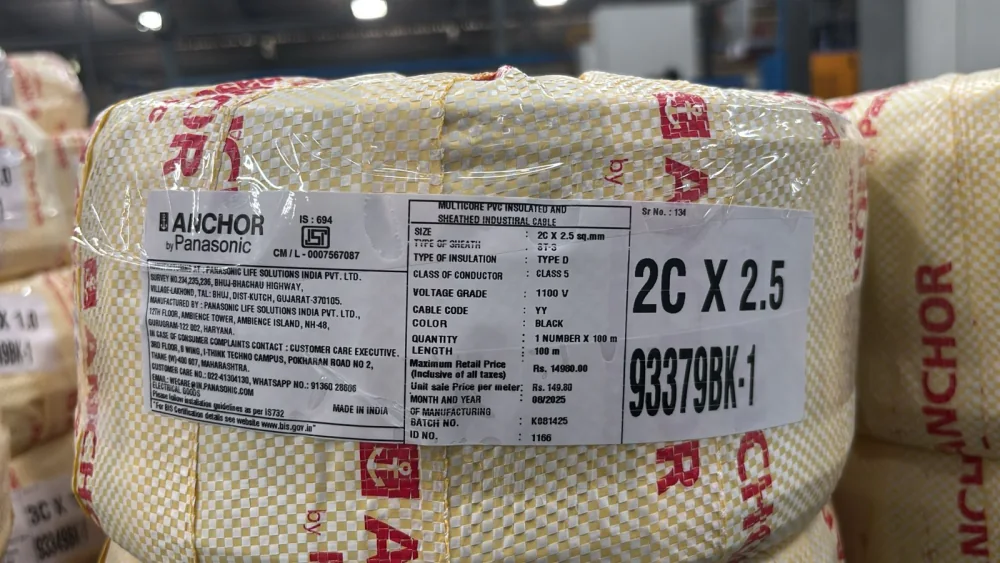
Electrical cable packagingCable specification, quantity, length, MRP, manufacturing batch and package identity.

Real printed samples supplied by Punit. Customer names and fields appear as printed; final label size, layout, barcode type and data fields are configured for each approved application.

05 / BUYER NOTE

The touchscreen is the weighing indicator

The operator does not need a separate desktop computer. Punit ERP runs on the scale-mounted touchscreen and controls product selection, accepted weight, label printing, inventory and dispatch actions.

FEATURES FOR THIS REQUIREMENT

What this touchscreen weighing scale with printer must solve.

Features are selected for this page's buying intent—not copied as a generic list.

01

production output labelling for bags, boxes, rolls and fabricated components

This requirement supports the goal to let an operator select a product, view live gross/tare/net weight, save an accepted transaction and print a traceable barcode label from the same 10.1-inch interface. It must be demonstrated with the actual product, label and operator flow.

02

raw-material inward with supplier, batch and product-specific tare

This requirement supports the goal to let an operator select a product, view live gross/tare/net weight, save an accepted transaction and print a traceable barcode label from the same 10.1-inch interface. It must be demonstrated with the actual product, label and operator flow.

03

finished-goods inventory where each label becomes a stock identity

This requirement supports the goal to let an operator select a product, view live gross/tare/net weight, save an accepted transaction and print a traceable barcode label from the same 10.1-inch interface. It must be demonstrated with the actual product, label and operator flow.

04

dispatch verification using a scanner and customer-linked packing list

This requirement supports the goal to let an operator select a product, view live gross/tare/net weight, save an accepted transaction and print a traceable barcode label from the same 10.1-inch interface. It must be demonstrated with the actual product, label and operator flow.

05

touchscreen location, viewing angle and operator reach

This requirement supports the goal to let an operator select a product, view live gross/tare/net weight, save an accepted transaction and print a traceable barcode label from the same 10.1-inch interface. It must be demonstrated with the actual product, label and operator flow.

06

product master, dynamic detail fields and permission design

This requirement supports the goal to let an operator select a product, view live gross/tare/net weight, save an accepted transaction and print a traceable barcode label from the same 10.1-inch interface. It must be demonstrated with the actual product, label and operator flow.

HARDWARE + SYSTEM SPECIFICATION

Published configuration for touchscreen weighing scale with printer.

Final values are confirmed in the quotation after reviewing the application.

Touchscreen10.1-inch Android operator display
RangeConfigurations from 0.200 mg readability through 10-ton capacity
Platform300 x 300 mm to 1800 x 1800 mm in SS or MS
PrinterRibbon-based thermal-transfer label printer
Commercial scopeApplication-specific quotation after requirement review

Normal scale vs Punit touchscreen system

Operator outputNormal: weight display onlyPunit: guided product, weight and print workflow
Data entryNormal: handwritten or manually typedPunit: compatible live scale capture
TraceabilityNormal: no package identityPunit: barcode/QR label and transaction history
Stock & dispatchNormal: separate registersPunit: inventory, scanning and dispatch reports
ConnectivityNormal: isolated indicatorPunit: hybrid cloud/offline Punit ERP
EXPERIENCE + TECHNICAL REVIEW

Reviewed from both sides of the system.

Last technically reviewed 18 July 2026 · Product scope is confirmed in the final quotation.

Gaurang VakhariaDirector · Weighing Systems

Approximately 30 years of experience reviewing weighing capacity, platform, loading, installation and Legal Metrology considerations.

Saumya VakhariaTechnology · Automation

Approximately six years of experience reviewing Punit ERP, printing, inventory, inward, dispatch and connected weighing workflows.

Read the Punit story, address and credentials →
LIVE PRODUCT VIDEO

Watch the weighing scale print a real label.

See the complete Punit system in operation: live weight capture, touchscreen controls, product details and printed output. Use the video to understand the hardware before requesting a configuration for touchscreen weighing scale with printer.

DIRECT ANSWER

The touchscreen is not a decorative monitor. It runs the Punit ERP operator workflow and connects weighing, label templates, inward, inventory, barcode dispatch and reporting.

01 / IN-DEPTH

A direct answer for touchscreen weighing scale with printer

Commercial investigation: the buyer already understands weighing and printing, but wants a modern operator interface, product selection, stored transactions and software-led control in one workstation.

The touchscreen is not a decorative monitor. It runs the Punit ERP operator workflow and connects weighing, label templates, inward, inventory, barcode dispatch and reporting.

This page serves a factory owner, production manager, warehouse manager or automation team replacing a keypad indicator, handwritten slip or separate computer station. The required result is to let an operator select a product, view live gross/tare/net weight, save an accepted transaction and print a traceable barcode label from the same 10.1-inch interface. Closely related wording includes “touch screen weighing machine with printer”, “Android weighing scale with barcode printer”, “smart weighing scale with Punit ERP”, but the product should be selected from the actual transaction rather than the keyword alone.

02 / IN-DEPTH

Where touchscreen weighing scale with printer fits

Production output labelling for bags, boxes, rolls and fabricated components. For this application, the buyer should first resolve touchscreen location, viewing angle and operator reach. Acceptance should include a live check to operate the screen with the intended gloves and lighting. This links the search requirement to an observable result rather than a generic feature claim.

Raw-material inward with supplier, batch and product-specific tare. For this application, the buyer should first resolve product master, dynamic detail fields and permission design. Acceptance should include a live check to place a real load and confirm stable gross, tare and net values. This links the search requirement to an observable result rather than a generic feature claim.

Finished-goods inventory where each label becomes a stock identity. For this application, the buyer should first resolve stable-weight rule, tare method and optional kg-to-pieces conversion. Acceptance should include a live check to print and scan the actual 75 x 50 mm to 150 x 150 mm label. This links the search requirement to an observable result rather than a generic feature claim.

Dispatch verification using a scanner and customer-linked packing list. For this application, the buyer should first resolve label size, ribbon, adhesive and barcode content. Acceptance should include a live check to disconnect internet and verify the approved offline flow. This links the search requirement to an observable result rather than a generic feature claim.

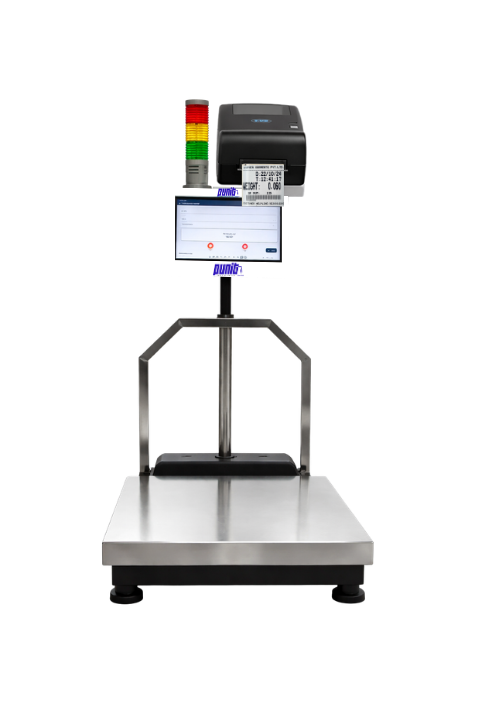
Punit Touchscreen Weighing Scale With Printer with 10.1-inch touchscreen, platform and barcode label printer
Actual Punit touchscreen weighing scale configuration. Final platform, capacity, printer and mounting are selected for the application.
03 / IN-DEPTH

Configuration decisions specific to this search

Touchscreen location, viewing angle and operator reach is decision 1. It affects whether the system can let an operator select a product, view live gross/tare/net weight, save an accepted transaction and print a traceable barcode label from the same 10.1-inch interface. Record the selected approach in the quotation and connect it to the relevant operator step, printed output and stored record.

Product master, dynamic detail fields and permission design is decision 2. It affects whether the system can let an operator select a product, view live gross/tare/net weight, save an accepted transaction and print a traceable barcode label from the same 10.1-inch interface. Record the selected approach in the quotation and connect it to the relevant operator step, printed output and stored record.
Stable-weight rule, tare method and optional kg-to-pieces conversion is decision 3. It affects whether the system can let an operator select a product, view live gross/tare/net weight, save an accepted transaction and print a traceable barcode label from the same 10.1-inch interface. Record the selected approach in the quotation and connect it to the relevant operator step, printed output and stored record.
Label size, ribbon, adhesive and barcode content is decision 4. It affects whether the system can let an operator select a product, view live gross/tare/net weight, save an accepted transaction and print a traceable barcode label from the same 10.1-inch interface. Record the selected approach in the quotation and connect it to the relevant operator step, printed output and stored record.
Offline continuity, cloud synchronisation and report ownership is decision 5. It affects whether the system can let an operator select a product, view live gross/tare/net weight, save an accepted transaction and print a traceable barcode label from the same 10.1-inch interface. Record the selected approach in the quotation and connect it to the relevant operator step, printed output and stored record.
04 / IN-DEPTH

How to verify the proposed system

Test 1: operate the screen with the intended gloves and lighting. Use real products, actual labels and the intended operator sequence. Capture the expected display, printed result and software status so suppliers are compared against the same acceptance condition.

Test 2: place a real load and confirm stable gross, tare and net values. Use real products, actual labels and the intended operator sequence. Capture the expected display, printed result and software status so suppliers are compared against the same acceptance condition.

Test 3: print and scan the actual 75 x 50 mm to 150 x 150 mm label. Use real products, actual labels and the intended operator sequence. Capture the expected display, printed result and software status so suppliers are compared against the same acceptance condition.

Test 4: disconnect internet and verify the approved offline flow. Use real products, actual labels and the intended operator sequence. Capture the expected display, printed result and software status so suppliers are compared against the same acceptance condition.

Test 5: complete inward, inventory and dispatch with the same test barcode. Use real products, actual labels and the intended operator sequence. Capture the expected display, printed result and software status so suppliers are compared against the same acceptance condition.

05 / IN-DEPTH

Why Punit for Touchscreen Weighing Scale With Printer

The touchscreen is not a decorative monitor. It runs the Punit ERP operator workflow and connects weighing, label templates, inward, inventory, barcode dispatch and reporting. This is the central difference Punit should demonstrate for this topic.

The solution is relevant when the business needs to let an operator select a product, view live gross/tare/net weight, save an accepted transaction and print a traceable barcode label from the same 10.1-inch interface. It is not the correct choice when the process only needs an unrelated billing, dynamic checkweighing or conveyor function that has not been included in scope.

Bring one representative material, target label, daily volume and required report to the demonstration. The final platform, capacity, readability, printer, scanner, Punit ERP modules, installation and support can then be confirmed without relying on assumptions.

06 / QUESTIONS

Practical questions, answered.

Seven intent-specific answers for buyers evaluating this exact requirement.

Is the touchscreen included?+

The product configuration includes a 10.1-inch touchscreen running the Punit ERP operator application.

Can it work without internet?+

Yes. Approved workflows can continue with offline fallback and synchronize when connectivity returns.

Is it suitable for retail?+

Yes, for suitable barcode-label and weight-based retail workflows; billing and POS scope must be confirmed separately.

What should be tested before buying a touchscreen weighing scale with printer?+

Use your real material and confirm operate the screen with the intended gloves and lighting, place a real load and confirm stable gross, tare and net values, print and scan the actual 75 x 50 mm to 150 x 150 mm label, disconnect internet and verify the approved offline flow, complete inward, inventory and dispatch with the same test barcode. A quotation should define the expected result for each acceptance check.

Which configuration factors matter most for touchscreen weighing scale with printer?+

Review touchscreen location, viewing angle and operator reach, product master, dynamic detail fields and permission design, stable-weight rule, tare method and optional kg-to-pieces conversion, label size, ribbon, adhesive and barcode content, offline continuity, cloud synchronisation and report ownership. Final capacity, readability, platform, printer and software scope must be selected together.

What makes the Punit approach different for this requirement?+

The touchscreen is not a decorative monitor. It runs the Punit ERP operator workflow and connects weighing, label templates, inward, inventory, barcode dispatch and reporting.

How can I get an exact quotation?+

Share the material, maximum load, platform footprint, required readability, sample label, daily volume and software workflow. Punit will then confirm the bill of materials, installation and commercial scope.

Discuss your application

Build the right weighing workflow before choosing hardware.

Share your material, capacity, label and software requirement directly with the Punit product team.

QUICK ENQUIRY

Get the right touchscreen weighing scale with printer configuration

Share your application. The completed enquiry opens in WhatsApp so you can send it directly to Punit.

No payment required. Configuration and final price are confirmed after application review.